
Daily transaction recap
Transaction Recap summarises sales and refunds for a period. Use it to close the day, match deposits by payment method, or compare cashiers and outlets.
Build a recap
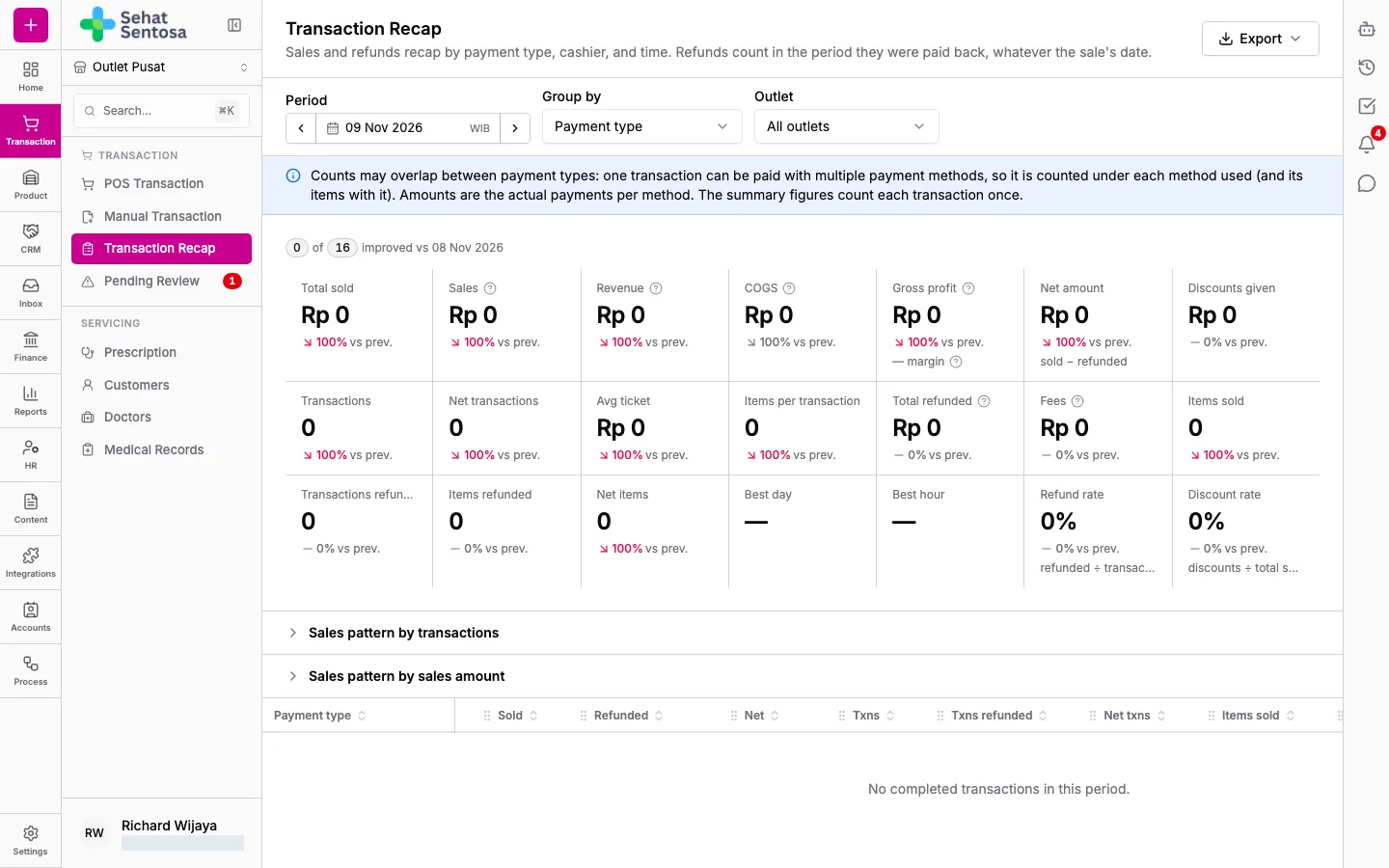
Section titled “Build a recap”- Go to Transaction → Transaction → Transaction Recap.
- Under Period, pick the start and end date and time. You can also change the time zone.
- Under Group by, choose one of:
- Payment type
- Payment account
- Cashier / sales
- Time bucket (hourly)
- Day
- Outlet
- Sales channel
- Under Outlet, pick one outlet or All outlets.
Read the recap
Section titled “Read the recap”- The summary cards include Total sold, Total refunded, Net amount (sold minus refunded), Transactions, Items sold, Avg ticket, Gross profit, Discounts given, Best hour/Best day and Refund rate. Each card is compared with the previous period.
- Sales pattern shows a heat map of sales by weekday and hour, by transaction count or by sales amount.
- The table below breaks down Sold, Refunded, Net, transaction and item counts, and Avg ticket for each group, compared with the previous period.
Export or print
Section titled “Export or print”- Click Export.
- Choose Excel (.xlsx), CSV or Print.